I Can’t Create A PRN visit
I Can’t Create a PRN Visit
Location: Point-of-Care > Visit/Assessment (Start PRN)
Overview
- If you see a popup when starting a PRN visit, a qualifying PRN order is required before the assessment can be created.
- This requirement is driven by a global setting that enforces PRN order validation.
What to Look For - A PRN order exists for the patient.
- The order text includes the word PRN.
- The order date qualifies for the visit (see Global Setting section below).
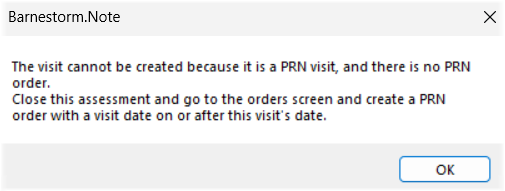
How to Resolve
- Exit the assessment screen.
- Go to the main menu and select the Orders tab.
- Select an Order Type (optional) or leave it blank.
- In the text area, enter the order and include the word PRN.
Example: SN: PRN visits as needed for catheter change.
- Save the order as normal.
- Start the Visit/Assessment as you normally would.
- You'll receive a pop up stating a PRN order was found. Click OK to proceed.
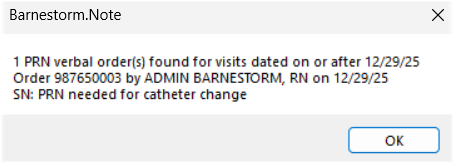
Global Setting That Triggers the Message
- A global setting will enforce PRN order validation and prevent PRN assessments from being created when a qualifying PRN order is not found.
Setting Location - Codes > Security > Global Settings > POC
POC Setting 0795 - 0795: When true, the system checks for a PRN order with a visit date greater than or equal to the visit time-in.
- If a qualifying PRN order is not found, the assessment cannot be created.
- This is a checks-and-balance feature to help ensure PRN visits are aligned with valid PRN orders.
Note: Global settings affect system-wide behavior. Only authorized users should review or update these settings, as needed.