Deactivate a Job Code
How to Make a Code No Longer Available for Use
Overview
Mark a Job Code as Do Not Use (DNU) when you no longer want it to show up as an option.
This will remove the Job Code from:
- Point-of-Care > Visit/Assessment > Start
- Aide Plans
- EVV Visits
- Schedules
ImportantThe only screen it may allow you to select it from is the Employee Activity > Visit Entry.
Steps to Deactivate a Job Code
- Go to Codes > Rates > Job Codes.
- Type the program code and job code to bring up the job code to be deactivated.
- In the Description field, type in DNU at the end of the current description.
- For example: Skilled Nursing DNU
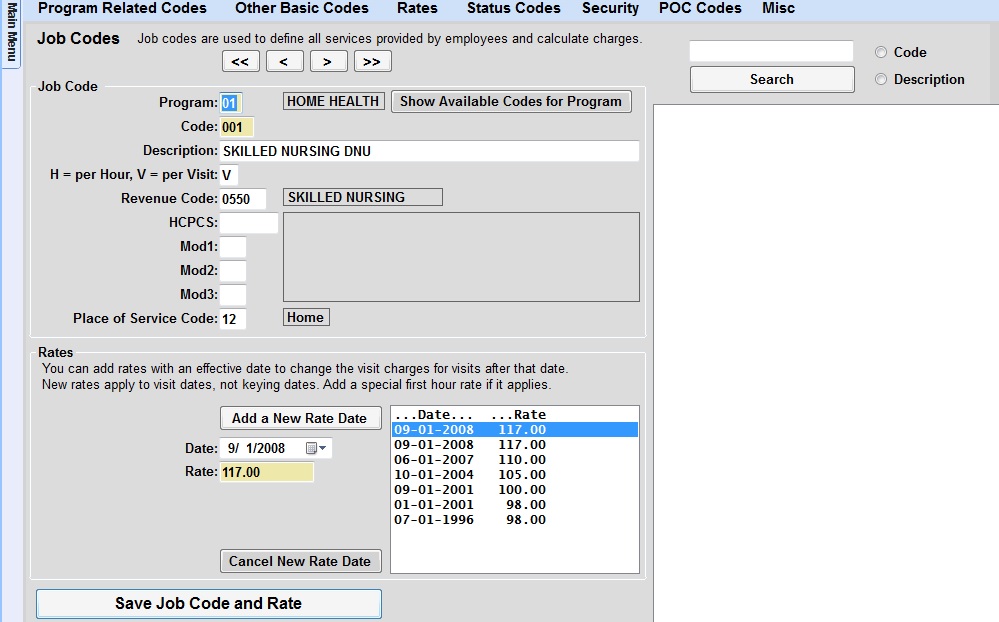
- Click the Save Job Code and Rate button.
- POC users will need to complete a Sync to grab those changes.
Steps to Reactivate a Job Code
- Go to Codes > Rates > Job Codes.
- Type the program code and the job code to bring up the job code to be reactivated.
- In the description, remove DNU.
- Click the Save Job Code and Rate button.
- POC users will need to complete a Sync to grab those changes.
When you reenter the Visit/Assessment screen, in POC, the job code will reappear as an available code for use.